
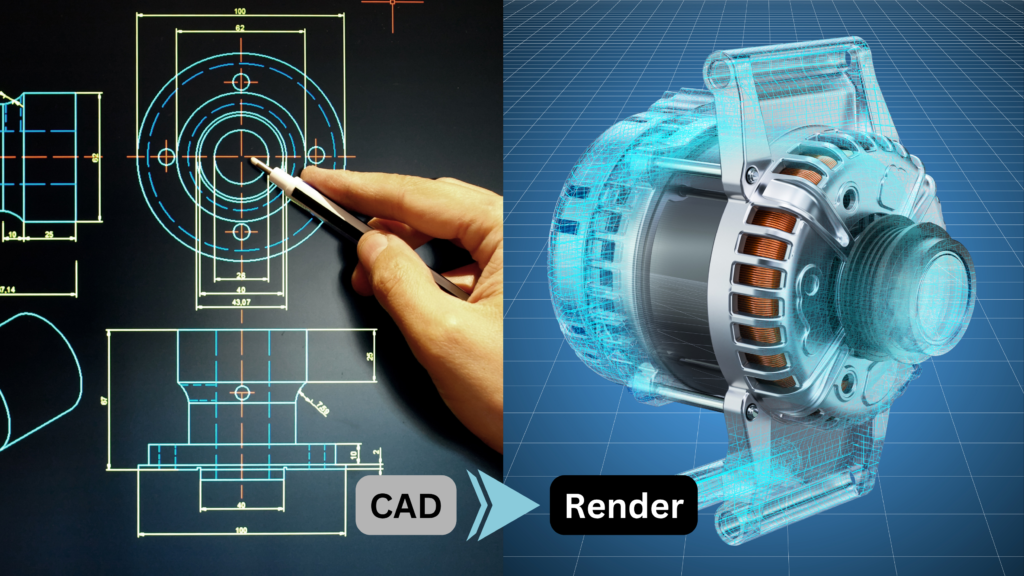
You have spent months — sometimes years — engineering a product. Every dimension is precise. Every mechanism is tested. Your CAD model is a masterpiece of engineering detail. And then you need to show it to a client, a distributor, or a trade show audience, and you hand them a flat PDF with a line drawing. That gap between what your product is and how it gets communicated to the world is exactly what 3D visualization solves.
This guide walks you through how Indian manufacturers are converting their CAD files into photorealistic 3D visualizations, exploded view animations and interactive machine demos — step by step. Whether you are exploring this process for the first time or evaluating a vendor, this is the clearest and most practical explanation you will find.
Let’s begin with the most important question.
What Is CAD to 3D Visualization — and Why Does It Matter?
CAD (Computer-Aided Design) files are the native language of engineering. Formats like STEP, IGES, SolidWorks (.sldprt/.sldasm), AutoCAD (.dwg), CATIA and Inventor contain precise geometric data about your product — every surface, every component, every assembly relationship.
3D visualization converts that engineering data into visual assets your sales, marketing and training teams can actually use:
- Photorealistic still renders for brochures, websites and LinkedIn
- Exploded view animations showing how components assemble
- 360° interactive viewers that clients can rotate on any device
- Unity-based machine simulators for trade show kiosks and tablets
- Product launch videos without a single physical shoot
The critical point is that none of this requires you to rebuild your product model from scratch. Your existing CAD data is the raw material. A skilled 3D studio takes that data and produces a visual output that is both engineering-accurate and commercially compelling.
Why this matters for Indian manufacturers specifically:
India’s manufacturing exports are growing rapidly — machinery, engineering goods and industrial equipment are among the top export categories. But flat photos and PDF spec sheets do not close deals with buyers in Germany, the UAE or the USA. International clients expect to evaluate a product visually before committing to a factory visit. 3D visualization closes that expectation gap at a fraction of the cost of a demo machine.
Step-by-Step: How the CAD to 3D Visualization Process Works
Here is the exact process Salezii Technologies follows with every client — from the first file you send us to the final deliverable in your hands.
1
Discovery — Understanding What the 3D Asset Needs to Do
Before we open a single CAD file, we start with a brief. What is this 3D asset for? A trade show simulator runs in real time and needs optimised geometry. A photorealistic brochure render can handle high polygon counts. A LinkedIn product video needs cinematic lighting and camera motion. The output format determines every decision that follows. We also ask: Who is the audience? A machinery buyer evaluating a purchase needs different visual emphasis than an operator learning a maintenance procedure.
2
CAD File Audit and Preparation
Once we receive your files — STEP, IGES, SolidWorks, Inventor, or any major CAD format — we audit the geometry. CAD files built for engineering precision often contain data that is irrelevant or counterproductive for visualisation: internal components that will never be seen, thousands of small fasteners that slow render times, and geometry tolerances set for manufacturing rather than visual accuracy. We clean, repair and optimise the geometry for its intended visual purpose without changing any external surface or mechanism. This step is invisible to you, but it determines the quality of everything that follows.
3
3D Modelling — Enhancing What CAD Cannot Capture
CAD models are built for function. They do not include surface texture, material properties, environmental context or visual storytelling. Our 3D modellers add what CAD cannot: accurate material shaders (brushed aluminium, powder-coated steel, rubber seals, transparent polycarbonate panels), realistic lighting setups that reveal form and depth, background environments appropriate to the product’s context (factory floor, trade show booth, white studio), and any decorative or brand elements such as company logos, colour variants and safety labels. This is where the engineering model becomes a product you are proud to show.
4
Animation Rigging (for Moving Deliverables)
If your deliverable includes an exploded view animation, a machine operation sequence or a product reveal video, this is the stage where mechanisms are rigged. Rigging means establishing the movement rules: this component translates along this axis, this door rotates 90 degrees on this hinge, this conveyor belt cycles at this speed. For machines with complex kinematics — packaging machines, CNC equipment, hydraulic systems — rigging is technically demanding work that requires both 3D skill and mechanical understanding. This is one area where an engineering-background studio has a significant advantage over a generic creative agency.
5
Rendering or Real-Time Build
This step differs depending on your deliverable type. For still images and video, we use offline rendering: the software calculates every ray of light in the scene and produces a photorealistic output. A single high-resolution hero render typically takes 20 minutes to several hours to compute, depending on scene complexity and resolution. For interactive applications — 360° viewers, Unity simulators, AR experiences — we use real-time rendering, where the scene runs at 60 frames per second on the end device. Real-time requires a fundamentally different pipeline: lower polygon counts, baked lighting, optimised textures. Both outputs can look exceptional; the choice depends entirely on how the asset will be used.
6
Review, Revision and Client Approval
You review the 3D draft against a structured checklist: Is the geometry accurate? Are the materials correct? Does the camera tell the right story? Does the animation sequence match the actual machine operation? We build two structured review rounds into every project. Revisions at this stage are fast because we are working in 3D — changing a material, adjusting a camera angle or updating a colour variant takes minutes, not days. Compare this to a physical photoshoot where reshooting costs you the entire studio session.
7
Final Delivery in All Required Formats
We deliver your 3D assets in every format your team needs: high-resolution PNG and JPEG renders for print and web, MP4 video files for social media and trade shows, WebGL or GLTF files for web-based interactive viewers, EXE or APK files for desktop or Android kiosk applications, and USDZ or GLB for AR on iOS and Android. We also retain the master scene files — so when you launch a new product variant, update a colour option or add an attachment, the new asset is produced from the same master without rebuilding from scratch. Your 3D library grows with your product line.
What CAD Formats Do 3D Visualization Studios Accept?
One of the most common questions we receive from manufacturers is: ‘We use SolidWorks internally — will that work?’ The answer is almost always yes. Here are the formats Salezii accepts:
- STEP (.stp, .step) — the universal interchange format; works with every CAD system
- IGES (.igs, .iges) — older but widely supported
- SolidWorks (.sldprt, .sldasm) — native format; best fidelity
- Autodesk Inventor (.ipt, .iam) — fully supported
- AutoCAD (.dwg, .dxf) — 2D and 3D geometry accepted
- CATIA (.CATProduct, .CATPart) — used in aerospace and automotive
- Fusion 360 (.f3d) or exported STEP — either accepted
- 3DS Max, Blender, OBJ, FBX — if you already have a 3D model
If you are unsure what format to export, STEP is always the safest choice. It preserves full 3D geometry and is supported by every CAD and 3D application.
Common Mistakes Manufacturers Make When Starting a 3D Project
Having worked with packaging machinery manufacturers, engineering OEMs and industrial equipment companies across India, these are the mistakes we see most often:
Sending incomplete assemblies. A CAD file with missing parts or broken references creates geometry errors that slow production. Send the complete assembly with all referenced files, or export as a single consolidated STEP file.
Not defining the output purpose upfront. A client who asks for ‘3D of our machine’ without specifying whether it is for a website, a trade show kiosk, a LinkedIn post or a training app will receive a deliverable that is technically correct but not fit for purpose. The brief drives everything.
Expecting photorealism from real-time applications. A Unity simulator that runs in real time on a tablet cannot look identical to a V-Ray rendered still image. Both look excellent — but they are different outputs optimised for different goals. Understanding this avoids disappointment.
Treating the 3D asset as a one-time deliverable. Your best-value 3D investment is a master scene file that can produce multiple outputs — renders, animations, interactive apps, AR — over the life of the product. Invest in the master; the derivatives are comparatively cheap.
How Much Does CAD to 3D Visualization Cost in India?
Cost varies significantly based on three factors: complexity of the product geometry, number and type of deliverables, and the quality tier required. Here is a realistic framework:
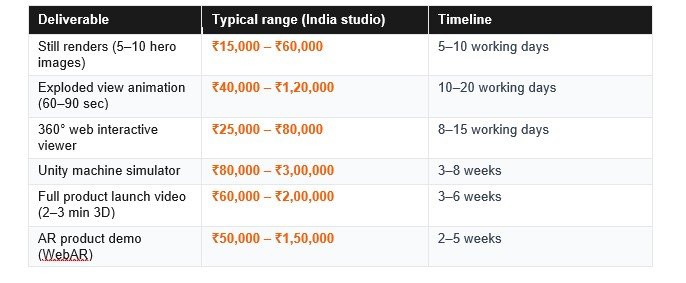
Note: These ranges reflect Pune-based studio rates. European agencies typically charge 3–5× more for equivalent quality. Getting a specific quote requires sharing your CAD files and defining your deliverable brief.
How to Choose the Right 3D Visualization Studio for Your Industrial Product
Not all 3D studios are equal — and this matters especially for industrial products. Here is what to look for:
- Engineering understanding first.
- Portfolio in your industry.
- CAD-first workflow.
- Structured review process.
- Master file ownership.
Conclusion: Your CAD Data Is More Valuable Than You Think
The CAD model of your product already contains everything a 3D visualization studio needs to produce world-class marketing and training assets. The investment you have already made in engineering precision does not have to stop at the factory door.
Indian manufacturers who are winning international business in 2026 are the ones who communicate their products visually — not just technically. A well-executed 3D visualization package replaces a ₹12 lakh trade show exhibit, closes export deals without factory visits, and trains operators without touching the live machine.
The process, as this guide shows, is structured and predictable. It starts with your existing CAD files and ends with a visual asset library that serves your sales, marketing and training needs for years.
Frequently Asked Questions
Can I get a 3D visualization if my CAD model is incomplete?
Yes, in many cases. We can work with partial assemblies, reference drawings or even detailed product photos to fill in missing geometry. Share what you have and we will tell you what is possible.
Do I need to share my confidential CAD files?
We sign an NDA before any files are shared. Your engineering data is protected and never shared with any third party. This is standard practice for all Salezii projects.
What is the difference between a 3D render and a 3D animation?
A render is a still image — a single frame computed from a defined camera angle, lighting setup and material. An animation is a sequence of frames that shows movement over time — a mechanism operating, components assembling, or a camera orbiting the product. Both are produced from the same 3D model; the difference is time and motion.
How long does a typical 3D visualization project take?
Still renders typically take 5–10 working days from receipt of CAD files. Animations take 2–4 weeks. Interactive Unity applications take 3–8 weeks depending on complexity. All timelines assume prompt client feedback during review rounds.
Can the same 3D model be used for multiple outputs?
Yes — and this is one of the strongest arguments for investing in a quality master 3D model. The same scene file can produce still renders for your brochure, an exploded view animation for your website, an interactive demo for your trade show kiosk, and an AR experience for your distributor catalogue. You build the master once; the derivatives are comparatively fast and inexpensive to produce.